
Agent Skill Best Practices
Building an Agent Skill comes down to six decisions. Your platform’s skill creator writes the file; these decisions are yours, and they decide whether the skill is worth having. This page sets out each one, walks through a full build, and shows how to test a skill on any platform. The applying-skill-best-practices skill in the Hands-on AI plugin applies all of it for you: name it when you ask your platform’s skill creator for a skill.
What a skill is, in one paragraph
Section titled “What a skill is, in one paragraph”An Agent Skill is a folder that teaches your AI how to do one kind of work, so you stop re-explaining it in every conversation. It holds one required file, SKILL.md, with a name, a description that says what the skill does and when to use it, and instructions. It can also hold resources: extra files the instructions point to, such as a long style guide or a template. Your AI reads every skill’s name and description all the time and opens the instructions only when a request matches, so a skill costs almost nothing until it’s needed. A reference skill holds knowledge your work draws on (your brand guidelines); a task skill holds a procedure you repeat (turning call notes into a post). See Agent Skills for the full picture.
The six decisions
Section titled “The six decisions”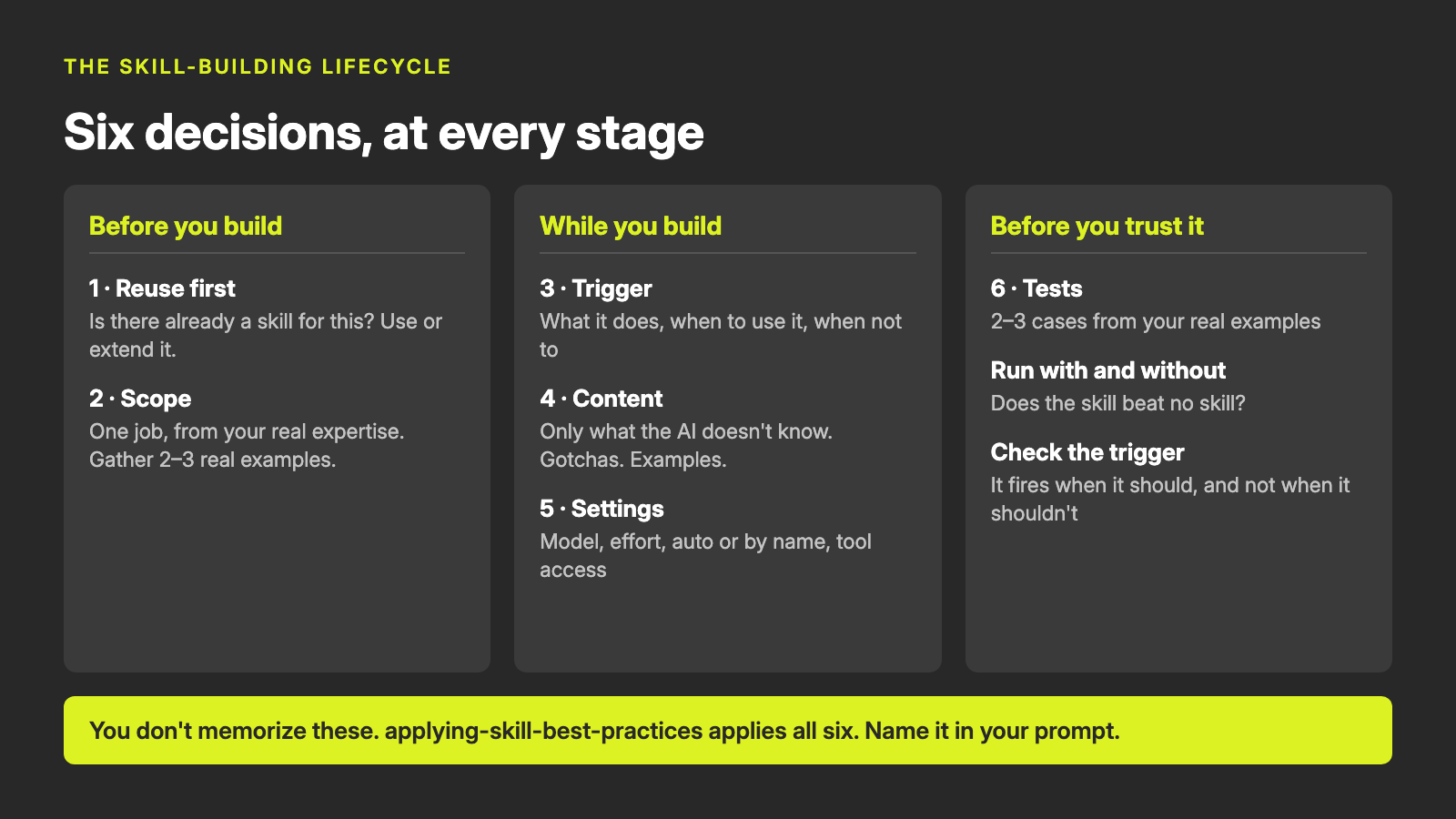
The decisions fall into three stages.
Before you build
Section titled “Before you build”- Reuse first. Before anything new gets built, check whether a skill for this job already exists: saved to your account on Claude or ChatGPT, in a folder on your computer, in a shared GitHub repository, or recorded in your AI Registry if you keep one. If one exists, use it as it is or extend it. A second skill for the same job means two sets of instructions that drift apart.
- Scope. One skill does one job. Too narrow, and several skills load for one request; too broad, and it never fires at the right moment. Build it from your real expertise: your own task, the corrections you make, your documents. The simplest way to supply that is two or three real examples of the task, each a starting input and a result you were happy with. No examples? Have your AI draft realistic ones and correct them; the corrections are your expertise going in.
While you build
Section titled “While you build”- Trigger. Before deciding to use a skill, your AI sees only its name and description, so the description decides when the skill runs. Write it as: what the skill does, then “Use when” and the situations and words that should start it, then “Not for” and the nearest things it could be confused with.
- Content. The instructions hold only what your AI would get wrong without them. Your AI already knows how to write an email; it doesn’t know your firm never names a client without permission. The most valuable section is usually a short list of gotchas: the specific mistakes the AI makes unless told otherwise. Add one every time you correct it.
- Settings. Whether your AI may start the skill on its own or only when you name it; which tools it may use; and, on Claude Code only at the time of writing, which model and how much effort it uses. A skill that sends, publishes or creates records in another system should run only when you name it. Where your platform has no setting for that, keep the description’s “Use when” narrow and start the skill by name.
Before you trust it
Section titled “Before you trust it”- Tests. A skill isn’t finished until it has been tested on your real examples: a few test prompts written the way you’d really ask, a plain description of what a good result looks like for each, the one case most likely to go wrong, and a handful of prompts that should and shouldn’t start the skill. Then run each test with the skill and without it, and compare.
Why these decisions, and why one skill
Section titled “Why these decisions, and why one skill”Four organizations publish guidance on building skills: Anthropic, which created the format; OpenAI; the open AgentSkills.io standard that Claude, ChatGPT, Codex and others implement; and Google. Microsoft documents how skills work on its own platform, listed under Sources. On most points they agree. On some they differ: Anthropic asks for descriptions in the third person (“Drafts follow-up emails…”), AgentSkills.io suggests addressing the AI directly (“Use this skill when…”). The pattern in decision 3 satisfies both. All four change as the platforms change.
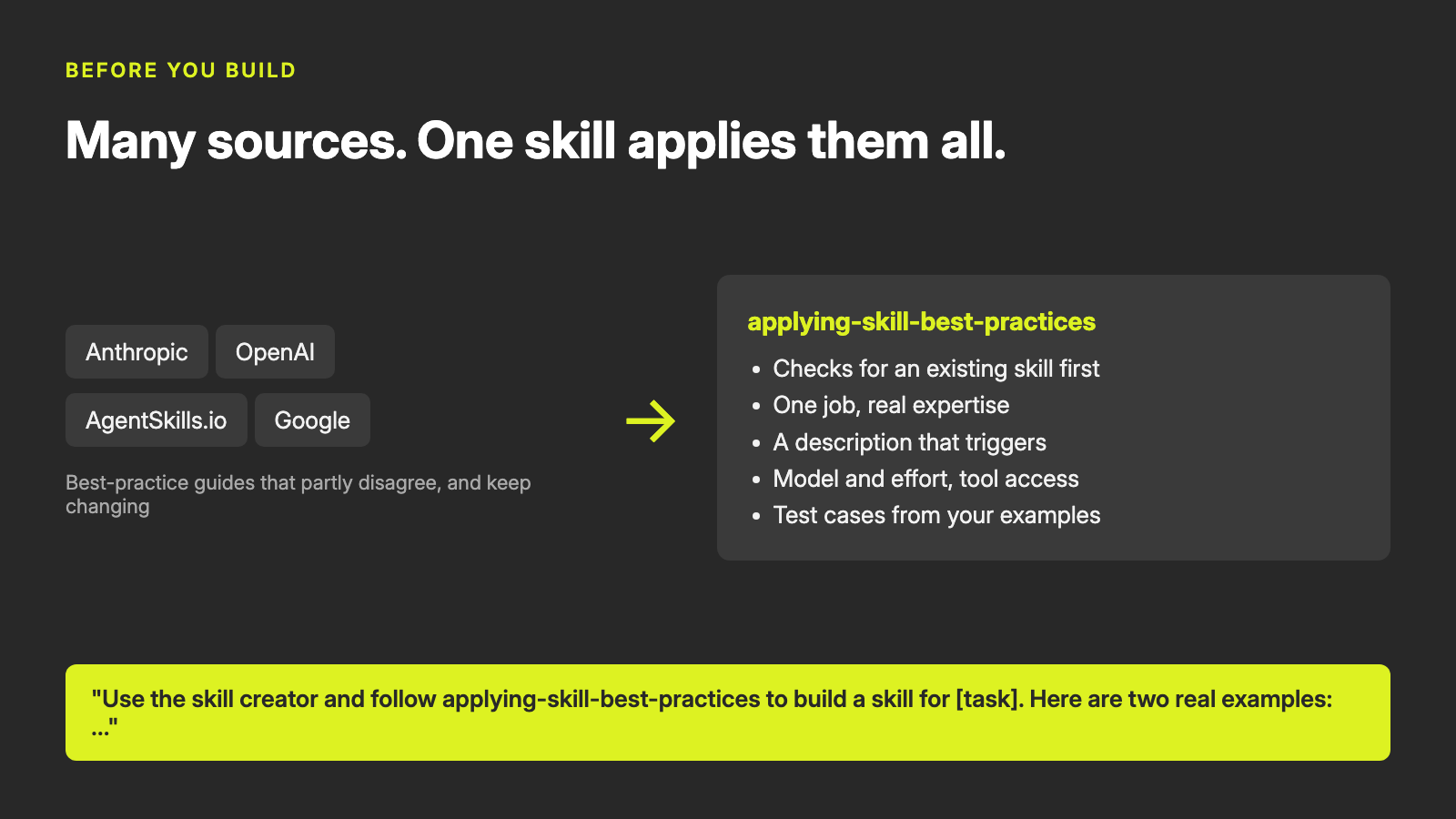
applying-skill-best-practices holds the six decisions, settled across those sources, so you don’t have to read them all. It doesn’t build skills; your platform’s skill creator does. Ask like this:
Use the skill creator and follow applying-skill-best-practices to build a skill for [task]. Here are two real examples of the task: …
When it loads, your AI says it’s following it. If it doesn’t, check that the skill is installed (on Claude under Customize → Skills; in Claude Code and Codex, /skills lists it), or attach its SKILL.md to the conversation.
Each decision exists because skipping it has a cost: two skills for one job that drift apart; instructions built from general knowledge that tell the AI nothing new; a skill that never fires; the one rule that matters buried under things the AI already knows; a skill that posts something when you only meant to discuss it; and a skill you trust because it looked fine once.
A worked example
Section titled “A worked example”A fictional consulting firm, Northwind Advisory, builds two skills on Claude Code: a brand-guidelines reference skill and a task skill that turns client call notes into a LinkedIn post.
The reference skill. The request names the skill creator and applying-skill-best-practices, with the brand guide attached. The AI checks first for an existing skill (none), then reads the guide against the firm’s two published posts and finds they disagree: the guide says posts run 120 to 200 words, the posts are under 100. It asks; the answer (the posts are right, posts run 80 to 150 words) goes into the skill, and the description comes out as:
Northwind Advisory’s brand voice, writing rules and formatting standards, applied to anything written in the firm’s name. Use whenever drafting, editing or reviewing an email, LinkedIn post, document, proposal or other text for Northwind, even if the user doesn’t mention “brand” or “voice”, and whenever another Northwind skill needs the house style. Not for other companies’ brands, for code, or for private notes that won’t be shared.
It runs automatically (it only holds knowledge), needs no tools, and sets no model or effort, because a reference skill loads inside other tasks.
The task skill. The reuse check finds the brand skill, so the new skill points to it rather than copying its rules. Two questions the examples raise (is it a rule never to name the client? what if the notes have no result number?) become the skill’s most valuable lines:
## Gotchas- Never invent a result. If the notes give no outcome number, don't estimate one.- Forecasts are not results. "We expect", "should save" and "on track for" stay out of the results line.- Anonymize the client. Use a name only if the notes say it is approved.Its test cases include the case most likely to go wrong: call notes with no measured result and a forecast the user asks to state as fact (“we should save around 15 hours a week… so say that”).
One test, with and without the skill. Without the skill, the AI handled the forecast well on its own, but ran to 188 words against a limit of 150, ended with a thank-you instead of a question, and used no hashtags. With the skill, it met every check, and flagged that the notes contained no measured result. The grading still caught one invention: the post said the team mentioned feeling calmer “first”, which the notes never say. That became a new gotcha and a new check for the next round.
The lesson in that result: the forecast check passed either way, so on its own it proves nothing about the skill. The checks that pass only with the skill (the firm’s rules, the length, the ending) are where the skill earns its place.
Testing a skill on any platform
Section titled “Testing a skill on any platform”| Platform | Who runs the tests |
|---|---|
| Claude Code | Give Anthropic’s skill-creator your real examples. It builds test cases from them, runs each with and without the skill in separate sessions, grades the checks, shows the results side by side, and can tune the description against your trigger prompts. |
| Claude | The same handoff. In a Claude task (the desktop app’s tasks) it can run the tests with and without the skill; in an ordinary chat it runs them in the conversation with no comparison, so use the steps below for that. |
| ChatGPT, Codex, Microsoft 365 Copilot, Gemini Enterprise | Hand the skill creator your real examples first and ask it to run the tests. Where it can’t, use the steps below. |
Running the tests yourself takes five steps:
- Without the skill: paste each test prompt into a new conversation with the skill off, and save the result.
- With the skill: paste it into a new conversation with the skill on, and save that result.
- Grade: in a new conversation, paste the grading prompt below with your checks and both results.
- Check the trigger: type each trigger prompt into a new conversation and note whether the skill started.
- Fix and rerun: take the “Fix next” list back to the skill creator, then run everything again.
Use a new conversation every time; one that has already discussed the skill isn’t a fair test.
You are grading one test of an AI skill. Be strict: a check is Met only if theresult shows concrete evidence for it. A heading with nothing under it is Not met.
Checks:[paste the checks for this test prompt, one per line]
Result WITHOUT the skill:[paste]
Result WITH the skill:[paste]
For each check, give Met or Not met for each result, with a short quote orspecific reference as evidence. Then write a test report with:- a header: skill name, round, platform, how it ran (by hand), and model;- the number of checks met with the skill and without it;- a table with one row per check: test prompt, check, without the skill,  with the skill, evidence;- if you ran trigger prompts, a table: prompt, should fire?, fired?, result;- a "Fix next" list with one line for every check not met with the skill  and every trigger that misbehaved, ending "Then rerun everything."
Going deeper
Section titled “Going deeper”Once the basic loop is a habit, three methods give you more confidence.
- Blind comparison. When you change a skill, show an independent reviewer (a fresh AI conversation works) the output of the old and new versions without saying which is which, and ask which is better and why. It catches differences that pass/fail checks miss, such as organization and polish, without the bias of knowing which version “should” win. Anthropic’s skill-creator can run this for you on Claude Code.
- Benchmarking across runs. AI output varies from run to run, so one pass can mislead. Run each test several times (three is a reasonable start) and compare the share of checks met, plus time and tokens, with and without the skill. A skill that adds a little cost for a large gain is worth it; one that doubles the cost for a small gain may not be. A result that swings between runs usually means an ambiguous instruction.
- Description tuning with held-out prompts. Write about twenty trigger prompts, half near-misses. Use roughly 60% to improve the description and keep 40% aside; judge each revision by the prompts you held back, so the description generalizes rather than memorizing your test phrases. Fix the category a failing prompt represents, never its exact words. Anthropic’s skill-creator automates this loop on Claude Code.
Keeping skills current
Section titled “Keeping skills current”Skills go stale: a model is retired, a skill another skill depends on is renamed, a description drifts out of step with how you work. The auditing-agent-skills skill, also in the Hands-on AI plugin, checks a set of skills against the same standards and proposes fixes. It never changes a skill without your approval. Ask it to “audit my skills”, or schedule it monthly where your platform allows.
Sources
Section titled “Sources”Checked on 2026-10-17.
- Skill authoring best practices (Anthropic)
- Agent Skills overview (Anthropic)
- Effort (Anthropic)
- Skills in Claude Code (Anthropic)
- skill-creator (Anthropic)
- Agent Skills specification (AgentSkills.io)
- Best practices for skill creators (AgentSkills.io)
- Optimizing skill descriptions (AgentSkills.io)
- Evaluating skill output quality (AgentSkills.io)
- Build skills (OpenAI)
- OpenAI skills (OpenAI)
- Skills in Gemini Enterprise (Google)
- Creating skills in Gemini CLI (Google)
- Customize Copilot Cowork (Microsoft)